

When Claude Code launched in the desktop app, maybe you thought you were done with the pressure to use engineering interfaces. Oh no, we’re just getting started! 🫠 Another tool launched recently that looks like an interface you’d probably like to ignore if you’re a non-technical person.What the heck is Jev, and why has it taken over our feeds?
I actually got slightly early access. And then logged in, and cringed when I saw the interface. I clicked around for about 10 minutes, then gave up!
A week later, the FOMO got me, and I pushed myself to test it on publicly available comments from Whoop (the screenless fitness band) customers. The gist of it: Jev doesn’t write out its answers like ChatGPT. This model’s design to tell you how likely it is that one answer to your question is correct. Which can definitely be useful, as long as you’re asking the right questions.
Despite it’s interface (which still bothers me tbh), you don’t need to be technical to use it. You just need to learn its language. I want to help you with that today: after this edition, you’ll understand what Jev can do, and test it on some customer comments of your own.
And…if the terminal still scares you, I have a new FREE course teaching you the basics of Claude Code for getting customer insights into product decisions -- in the terminal, or the desktop app, your choice. Access below…
In this edition:
🥾 Your Jev primer: what it is, where it fits in feedback work and 2 video tutorials
🎒 Data to Decisions: launching a FREE Claude Code course
🔭 The patterns I’m seeing lately, and what they say about our likely 2027 ways of working
🥾 TEST RUN
Your Jev primer
For the past three weeks, every second post in my feed was someone’s experiment in Jev -- but nothing I saw was about customer feedback.
If you are, like me, not particularly stoked about using engineering interfaces, I don’t want you to give up as quickly as I did that day! It’s worth clicking around in, if you know where to click.
So here’s what Jev is and how to try it faster than I did, with two videos that show:
how to start, what to use it for (testing with one customer comment), and
what you need to do to run Jev across 100s of comments
First, what even is Jev? Another model?
Jev is a new AI model from the team TypeSafe. But it’s a little different from your usual LLM. You give it something to look at and evaluate, like a customer comment, plus a question with potential answers you’ve defined. It tells you how likely each answer is.
Here’s the example I use in the video below: you’re in a supermarket, holding an apple. 🍎
What you’d give Jev to evaluate: “Deep red, gives a little when I press it, smells sweet.” This is not your usual “agent context” like background information for it to improve its answers, it’s the actual material it should evaluate with the following question.
What you ask: a yes/no question, “Is this apple ripe?”, plus define what counts as each answer. Something like…Yes = ready to eat today. No = needs a few more days, or it’s past it.
What comes back: not a long, written answer! A probability: 90% yes (it’s ripe), 10% no (it’s not) based on the information you gave it to evaluate.
Jev isn’t using its own idea of “ripe” here. It’s using yours, whatever you’ve told it is the measure it used. And the number should ideally tell you something you’d actually find useful, not a nice-to-have measure. At 90% you’d want to buy and eat this apple, at 55% you’d wait a day or two (or buy another, riper apple) - it helps you make the decision. Ask about every apple in the crate, and you’d be able to sort them, and choose the best one.
Now swap the apple for one customer comment. The comment is what Jev is evaluating, and we decide it should determine:
“Is this customer frustrated?” → and we’d get back something like “90% yes.”
“How frustrated are they?” → and we’d get back “75% very frustrated” and “12% somewhat frustrated”, etc.
Those are probabilities for each question’s answers. There’s a 75% chance that, based on the comment we provided, they are very frustrated. (So maybe we should reach out to that customer.)
Tutorial 1: How to start using Jev on customer feedback
▶️ This video walks you through Jev’s Playground, and how to set up your first test.
(Sorry for the voice, I’ve got a cold! 🤧)
〰️
Tutorial 2: How to use Jev on 100s of comments
▶️ Get set up to scale - how to run your Jev questions on 100s of customer responses from a CSV, through Claude Code, with an API key.
Here’s the overview of what you’d do to scale:
Test your questions on 3–5 comments in the playground. Make sure they deliver reasonable responses.
Get a Jev API key and save it in an
.envfile (or another API storing setup that works for your team).Paste the prompt below into your file-based AI tool or terminal (I use Claude Code in terminal in the video). Make sure you’ve launched the session from the folder that has your CSV.
Run a pilot test on 5 customer comments/rows. Don’t scale to 100s until you know it all works!
Fix your questions, rerun another pilot on the five comments.
Then run the questions on every comment you’ve got.
Important: We test the questions on a few comments first to make sure the questions work as set up, before running on 100s of comments. My pilot test on five comments in the video cost less than a cent, and caught one bad question before it got run across every comment I had.
Use this prompt
Here’s the prompt I used in the video — Copy it and swap in your file and questions:
I have a CSV called [YOUR_FILE].csv containing [NUMBER] customer comments.

I want to run a Jev experiment.

For EVERY comment, send the comment as the state to the Jev API and ask the exact same three questions below.

Question 1 — Noul (yes/no)
Instructions:
[Your yes/no question]

True:
[What counts as yes, specifically]

False:
[What counts as no, including near-misses that shouldn't count]

Question 2 — Score
Instructions:
[Your how-much question, about the specific problem you care about, not the problem in general]

Level 0 — [label]: [how to recognize it]
Level 1 — [label]: [how to recognize it]
Level 2 — [label]: [how to recognize it]
Level 3 — [label]: [how to recognize it]

Question 3 — Noul (yes/no)
Instructions:
[Your follow-up question. If it only makes sense when Question 1 is true, say so: "If the problem described here is caused by X, could Y plausibly solve that problem?"]

True:
[What counts as yes]

False:
[What counts as no]

Use the Jev API key from the JEV_API_KEY environment variable or my .env file. Never hard-code or print the API key.

Create a Python script called run_jev.py that:
- reads the CSV
- preserves every original column
- keeps the original customer comment verbatim alongside every Jev result
- sends each comment to Jev independently
- uses the same exact questions for every comment
- saves the Jev results in new columns
- saves the full probability distribution for the Score question if returned
- handles API errors and retries safely
- limits concurrency to a reasonable level
- writes the result to [YOUR_FILE]_jev_results.csv

IMPORTANT:
1. First inspect the CSV to determine the actual comment column name.
2. First run the script on ONLY 5 rows.
3. Do not run all rows until I have inspected the 5-row output.
4. Do not expose the API key.
5. Use the exact Jev API endpoint and model supported by the current account/API documentation rather than guessing.
6. Before running, show me the script and explain how it will work.
A few more examples of where you might use this in customer feedback work
Use this anywhere you’d ask the same precise question to your whole pile of comments. I’d consider questions and cases like:
“Does this customer need information during the task, or before and after it?”
“Is this problem caused by [the thing we’re deciding about], yes or no?”
“Which of my existing codes fits this open-ended answer best?”
“Which benefit is this review about?”
“How strongly do they feel that benefit?”
How’s this different from ChatGPT, Claude etc.?
ChatGPT and Claude write you an answer, often a long one, and you’ll have to dig through the prose and interpret what it all means. Jev doesn’t write at all. It picks from the answers you set up and gives each one a probability. It’s also fast and cheap, so asking the same set of questions for all your 1000s of customer comments doesn’t cost nearly as much.
That makes it a great tool for figuring out which buckets are best to put your customer feedback into without giving each just one final label from your set of tags/codes. It also makes it useful for determining the likelihood that customer statements are really annoyed versus somewhat annoyed and similar uses.
But it won’t come up with themes for you! It won’t come up with tags or labels. You bring the categories, you define the scores and scales, and Jev tells you where each comment fits best. This will likely become one of many model types we have in our toolkit in the future.
🎒 GEAR
Data to Decisions: a free Claude Code course

I’ve spent 6 months running a course and seeing where people new to Claude Code get stuck. So I thought I’d help new students figure out the basics before my course…and then ended up creating something free for everyone! 🫶
I think a lot more people have likely faced the same blockers to figuring out solid Claude Code use that I’ve seen students hit: not fully understanding the basics of Claude Code, not feeling sure of how to learn and apply them to get into advanced CC for insights work faster.
How this works: In ≈ 3 hours, you take a folder of fictional customer data through to verified findings, a written decision and a design critique of an existing screen, plus create and save a skill that reruns the whole thing much faster next time. You learn about important functionality, where to apply it on customer feedback work, and tons of tips along the way.
It’s free.
You need a paid Claude plan (Pro or above).
You need no coding skills or API keys.
You can see all the many things you’ll learn here 👇
🔭 The view from here
Two trends I’ve been thinking about lately:
1. Jev and OpenAI’s Decisions API are the same bet
Two weeks after Jev launched, OpenAI announced “Decisions API” which also answers from options you define. It’s in public beta since Oct 6.
What they’re both betting on, in their own words:
AI’s real work is often small judgment calls inside software. TypeSafe calls these “smart if-statements”: classify, route, score. OpenAI describes similar jobs: “classify content, route requests, and prioritize work.”.
Software needs an answer it can act on, not a paragraph. TypeSafe wants outputs “your code can branch on, sort by, and route with.”
It has to be cheap enough to use at volume. TypeSafe’s William Stanley Jevons-inspired argument: as the cost of intelligence falls, the number of useful applications expands.
Small, separate questions beat one giant prompt. Both recommend breaking complex decisions into discrete questions. (TypeSafe: “decompose it”; OpenAI: “Separate different concerns into different questions”)
Why this is a shift: TypeSafe argues that long-form LLM responses are useful for chat, but wrong for automation: someone still has to read the answer and decide what it means.
These systems aim to skip that step. You define the question and possible answers up front. The model picks an answer and gives you a probability. Now you can count it, sort it, route it, and compare it against known answers.
My take: A question like “is this customer requesting {feature a} or {feature b}?” can become something you ask 1,000 times, count, sort, and attach probabilities to—not a page-long set of explanations someone has to read and interpret.
This shift makes two human skills increasingly valuable:
Writing good questions.
Breaking a product decision into the smallest useful questions for the decision you’re trying to make.
〰️
2. AI is becoming a dress rehearsal for customers
Finding out your idea is bad after customers have seen it is very expensive. We’ve all accepted that cost for a long time, but I think this is what AI is changing for us most.
There are new tooling categories now that we didn’t have pre-AI: AI moderators, synthetic users, synthetic A/B testing, Jev-style scoring, and more. They are not making customers less important. I think they’re shifting where in a typical product process we actually bring customers in. It’s now cheap to do a kind of dress rehearsal with many things first, before going to users. We just really shouldn’t skip them entirely.
A few recent examples of the new layer:
Attention heatmaps predict where eyes land on a design or ad in seconds, with no participants. Limit: they predict looking, and looking isn’t wanting.
Figma’s AI user testing agent reviews your flows “from simulated user perspectives.” Limit: it’s closer to an expert review than to watching someone get lost. Figma’s own framing: “designed to complement, not replace, testing with real users.”
Synthetic survey pretesting runs simulated respondents through your draft surveys to catch broken logic and loaded questions. Limit: it finds wording bugs, not how real people read the question.
Each one of those is actually intended to rehearse the instrument (the screen, the ad, the survey), so your team’s time gets put toward what only real people can tell you, and doesn’t get wasted on pilot testing setups not entirely ready for showtime.
For more teams in the next year or so, I expect to see work look more like:
Human thoughts → AI-heavy pressure-testing → real customers’ input → human decision
Where much more of our testing is in the AI step before real users are even contacted.
I’m seeing this a lot now, but I think it will become even more common.
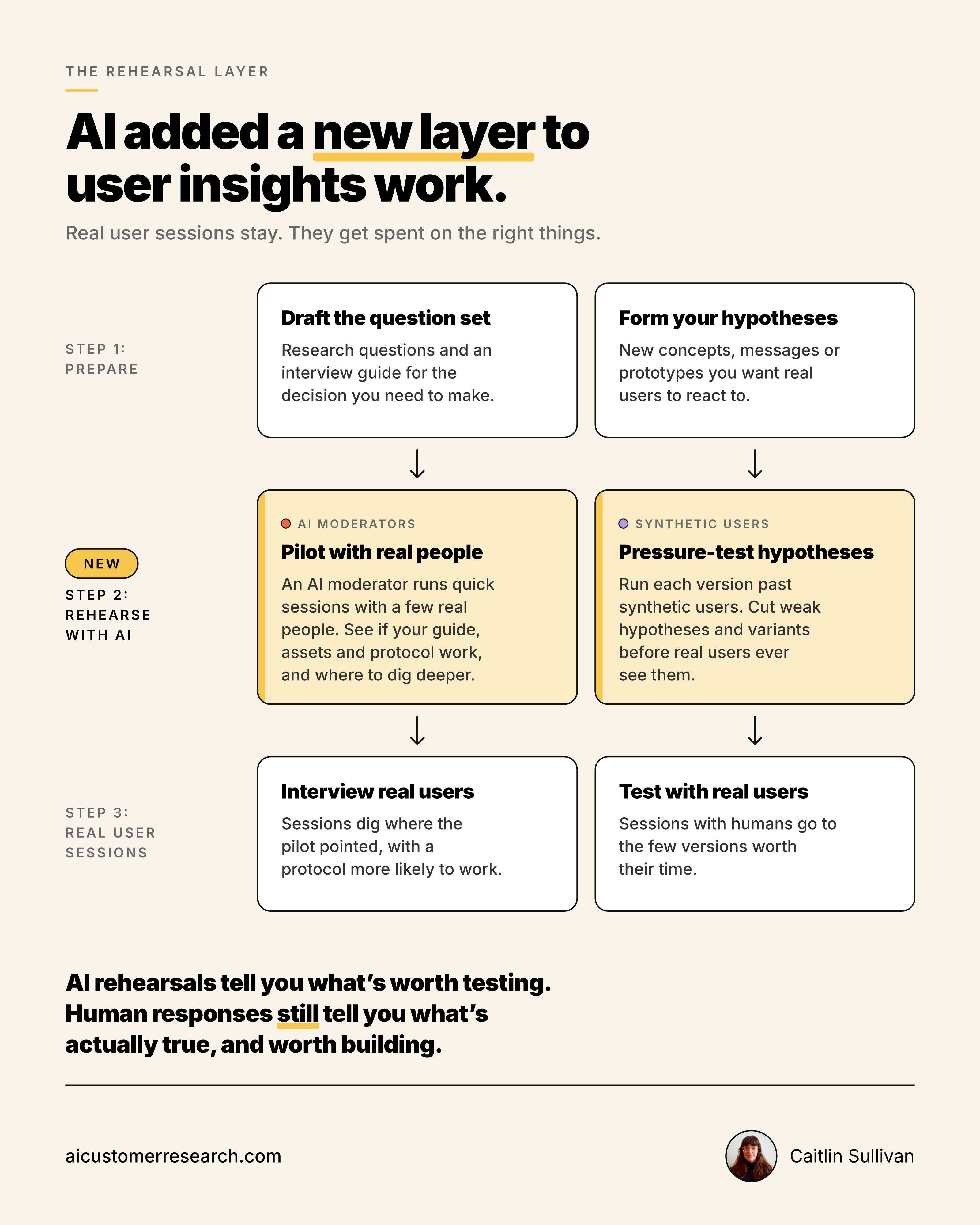
If AI can do more of the figuring out before we get to customers, what should we actually be using our time with customers for? I’m still looking for more concrete ways to break this down and share good examples of what the rehearsal looks like and finds, and what happens next.
If you have some input here from how your team is working, feel free to reply and tell me. I’d love to synthesize what many teams are doing for a future edition 🙏
Have a great weekend!
— Caitlin
P.S. Maybe see you in my final 2026 cohort of my Claude Code for Customer Insights course? Last chance for my personal, hands-on help to improve your workflows!
→ Join the course
JEV! yea thanks so much haven’t got my head round that yet! looking forward to reading this.
The apple-to-customer-comment walkthrough is the clearest non-engineer framing I've seen for Jev: you bring the buckets, it returns probabilities, it will not invent themes for you. The pilot-five-rows-before-the-CSV rule is the part most people will skip and then regret. One pushback: once you scale to hundreds of comments, the hard work is still writing criteria that don't drift between raters, not wiring the API. I run JevMade, with source-backed guides and a registry of experiments at https://jevmade.com if useful for that question-design step.