

✌️ Hey, I’m Caitlin. I help product, design, and insights folks do better customer research with AI—without the hype.
Dive deeper: Claude Code for Customer Insights (August enrolling) | more coming soon
If you’ve ever typed “I already told you that!” to an AI tool, it almost certainly wasn’t ignoring you.
Last week I watched workflow results tell a product team to run a study they’d already run and delivered. Despite that Claude’s memory files told it about the experiments. This shouldn’t have happened.
The problem was reliance on Claude’s automatic memory. A few details, rules and requirements they’d mentioned in sessions like “don’t forget this!” had been successfully saved to the tool’s automatic memory.
Claude wasn’t intentionally ignoring anyone (well, as far as I know). It just hadn’t accessed the information in the right moment.
This edition covers where memory and context live, why the file you write is a better foundation than the one your AI tool writes for itself, and what to put where so that anything you’d be annoyed to repeat only gets said once.
There’s also a 📹 demo that shows the first problem happening live, and the fix that handles multiple memory problems.
Let’s dig in.
In this edition:
🏕️ Base camp — where memory actually lives, when memory doesn’t follow with you, problems worth knowing and designing for - plus a demo video
🗺️ The route — fixes, a what-goes-where memory table, and a five-second audit
🌰 Trail mix — the benchmark that grows an agent’s context until it breaks, and more on memory from Anthropic
🏕️ BASE CAMP
Problems 1 and 2: Memory that goes missing
Two of the three big issues with memory are about memory being absent — it exists, just wasn’t there when you needed it. I’ll share (and show, video below) the big issues, why they happen, and why the file you wrote is more reliable than the file your AI wrote for itself.
Problem 1: The memory doesn’t follow you
Let’s start with Claude’s automemory.
Claude Code — and a growing number of tools like it — keeps its own memory. It writes the files itself, and updates them as you work.
That time you said, “now that you know X, don’t forget it!” — it typically saves that somewhere for later.
Memory is made up of multiple files saved over time, they live on your computer here:
~/.claude/projects/<your-folder-name>/memory/.
It’s a hidden folder in your home directory, with one slot per project, each slot named after the path of the folder it belongs to.
You can open these files, edit them, delete them. You can tell Claude to create one for you around a specific topic.
In this case, a “project” doesn’t mean your specific study or redesign or build, the thing you’d call a project in your daily work. It means the exact folder you were sitting in when you started up Claude. So any folder you start up Claude from gets a memory. (Ex: I’m often working in a big folder named “Screenshots/” 😅. So there’s a memory for that.).
Picture a notebook Claude keeps for each room it works in. It leaves it behind in that room when it’s done. Start work somewhere new, and it will open a fresh, blank notebook.
Let’s say you have a team folder like this:
Your company/             ← never started Claude here → no memory
└── Core product/         ← started up Claude here → gets its own memory
    ├── Q3 projects/      ← started Claude here too → a second, separate memory
    └── Q1 2027 research/ ← never started Claude here → no memory
But the notebook Claude created for itself in Core product is invisible from Q3 projects, even though one folder is inside the other. This is important.
(One exception. If your folder is a git repository, the whole repository shares a single notebook, whichever folder inside it you start from.)
Claude also uses CLAUDE.md context files.
Contrary to how automemory files work, CLAUDE.md files — the plain markdown files that you write yourself or ask Claude to write — they walk up the folder tree. Claude starts where you launched it and loads every other CLAUDE.md sitting in folders above it, all the way to the top.
So if you’re working in Q3 projects/ below, here’s what your session actually picks up:
Your company/
├── CLAUDE.md             ← loads all context from this file above where you are
└── Core product/
    ├── CLAUDE.md         ← loads all context from this file above where you are
    ├── Q3 projects/      ← you're working in THIS folder here
    │   └── CLAUDE.md     ← loads all context from this file, where you're working
    └── Q1 2027/
        └── CLAUDE.md     ← doesn't load: it's next to you, not above you
So we have two memory systems (Claude’s automemory and your own CLAUDE.md files) running side by side, but they don’t behave the same!
A rule you wrote in a CLAUDE.md at the top of a team folder is inherited by every project folder underneath it, forever, without anyone remembering it’s there. But automatic memory just stays where it was written, no trickle-down effects.
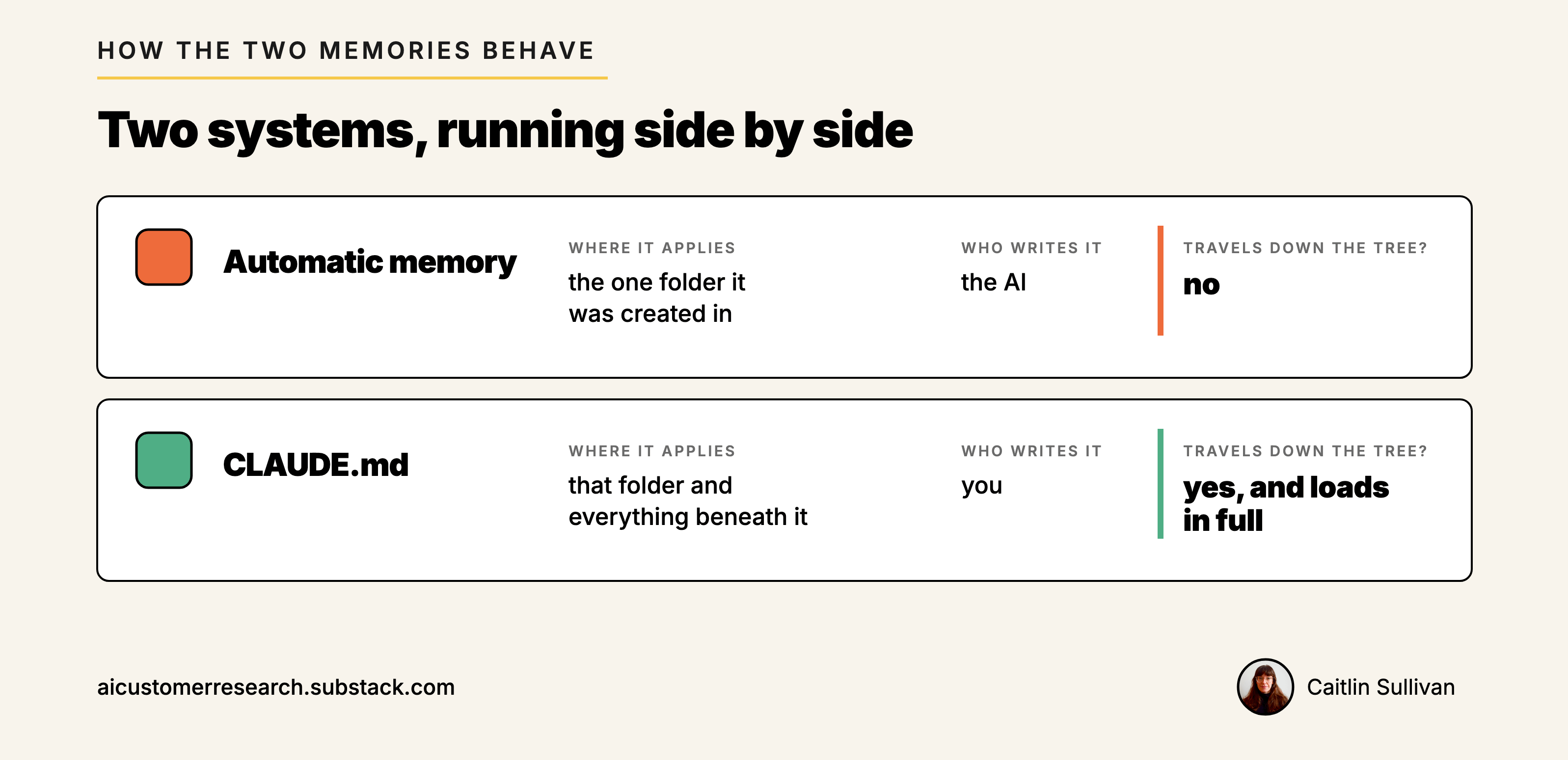
Why my client product team’s memory wasn’t working
For that product team, Claude was picking up a few key CLAUDE.md files perfectly. And one of them contained their this-year-only freeze on pricing/packaging changes. But the automatic memory containing details about four completed experiments they didn’t want to repeat sat in a folder one level up in Claude’s automemory from where they were working. That meant it never got read.
Why it matters: the context you care about most is sometimes the thing you told the tool once, in conversation, because you thought that was enough — and that ends up in the file that doesn’t move from whatever folder you were working in that day. Bummer.
〰️
Problem 2: The memory gets cut off without telling you
There’s a ceiling on the automatic memory index: the first 200 lines, or the first 25KB, whichever’s reached first. Information beyond that won’t be loaded when your session starts. Claude is told the file was cut short. But you aren’t told anything.
And because entries get appended to the bottom as you go, the newest thing you saved is the first thing to get dropped. There’s no “last-added = most current” logic here.
Long before you hit a ceiling, an unpruned memory file is carrying a topic from four months ago into a session that has nothing to do with it.
Every one of those lines competes for the model’s attention with the thing you actually asked about. More context loaded is not the same as more context used.
Why the file you wrote beats the file AI wrote
The clearest framing I’ve found comes from CoALA — Cognitive Architectures for Language Agents, by Sumers, Yao, Narasimhan and Griffiths. It sorts an agent’s memory into four kinds:
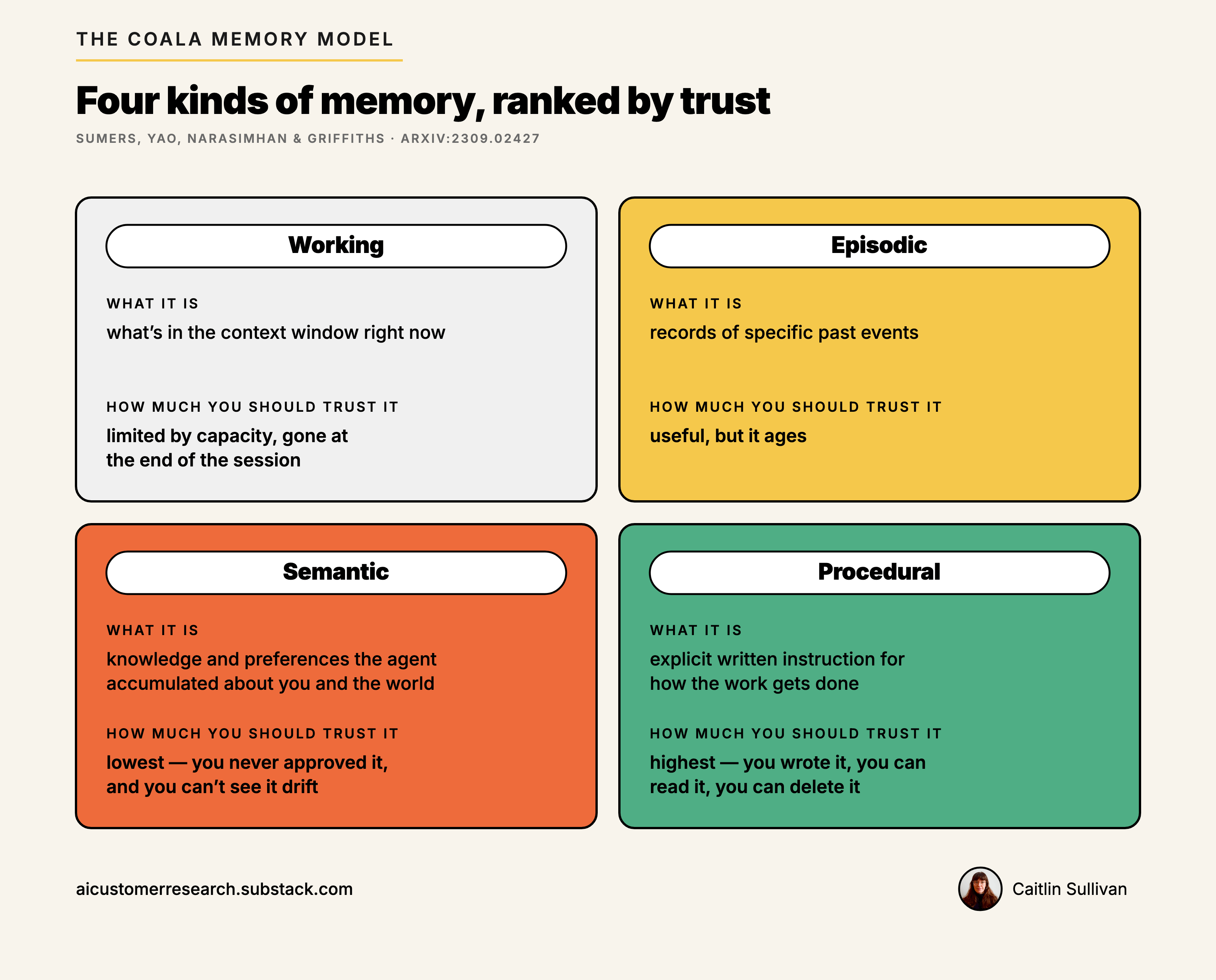
Automatic memory = episodic and semantic, written by the agent, on its own judgment, without a review step.
Procedural memory “must be initialized by the designer” (that’s you!") and letting an agent rewrite its own is, in the authors’ words, “significantly riskier.”
In other words…don’t rely on your tool to write all the memory it needs! Think strategically.
〰️
Watch it happen
I replicated and recorded the exact failure I saw my client product team face. Problem 1 on screen: the workflow proposing a study that already ran, three CLAUDE.md rules used correctly, while two memory folders sit side by side with nothing passing between them. Then the one block of markdown that enforces it, doesn’t let this memory lapse happen again.
🎒 That fix is one tiny lesson from the cohort. There’s a lot more that goes into building a reliable and resilient system for all your insights work — that’s what we spend two weeks on. Enrollment closes soon, we start Monday, August 31. → Join the cohort
〰️
Problem 3: The memory is there, but it’s wrong
Problems 1 and 2 are memory not coming along where you need it. The third is often the most expensive of the three: the memory is present, loaded, and out of date.
The decision log turns into a wall of outdated notes
I do recommend writing down what you’ve already decided so the AI stops rehashing it. But now imagine fast forwarding six months into the future.
You had a bunch of notes from six months ago. They were correct — back then. But since then, the team’s budget shifted, the freeze on pricing changes has been lifted — now all the execs just want you to fix the service tier packages, find a way to increase profit by shifting features around.
(And they want it yesterday, of course. “Please do this with AI so it’s faster,” they say).
Now the constraints listed in those files that saved you from Claude’s irrelevant pricing experiment ideas is now the reason it refuses to think about the biggest current priority on the roadmap.
Written context goes stale without you noticing, and it keeps sounding authoritative the whole time. Especially if it’s in the wrong place.
You don’t see what it’s carrying into your workflow
Without any memory at all, it’s simple: whatever you send in a prompt is what it knows. With existing memory files, something is being loaded before you type a word, and you likely have no idea what that is.
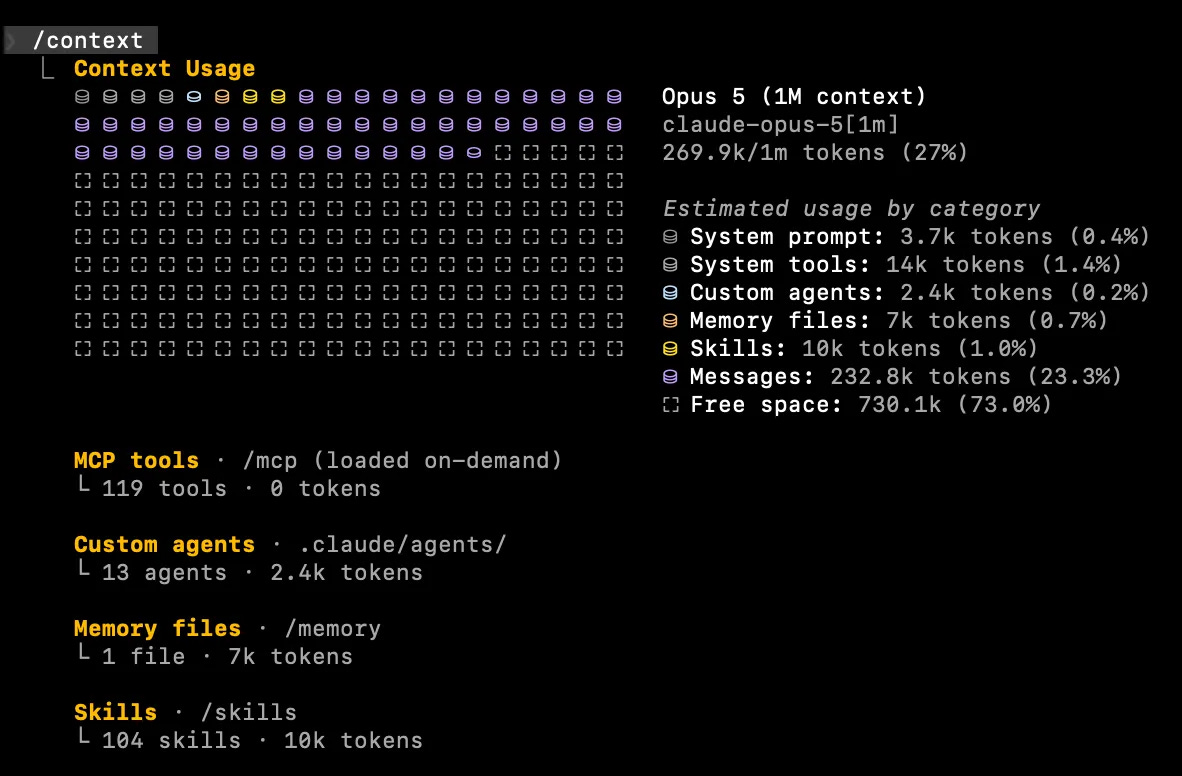
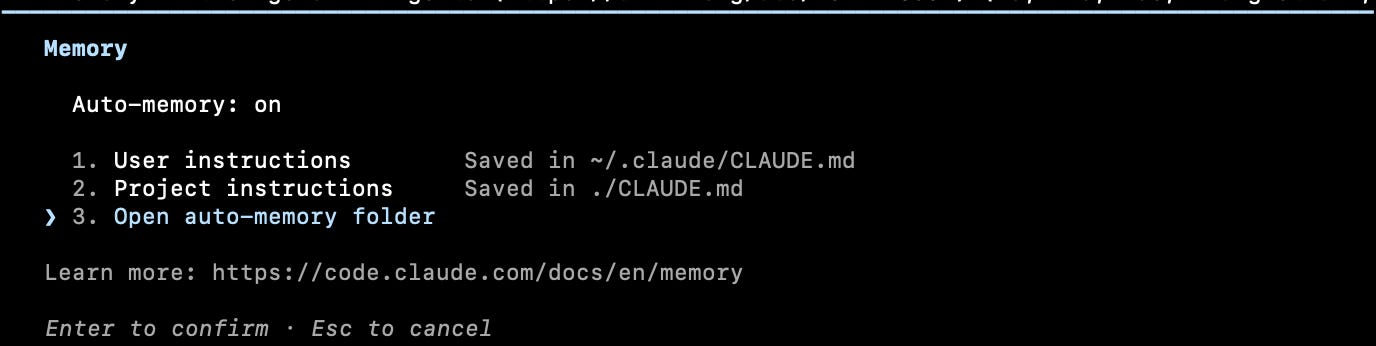
Two commands can sort this, and most people have never run either:
/contextshows if memory files were actually loaded this session, along with other context usage details/memorylists your memory files and opens the auto memory folder, so you can read, edit or delete anything that’s been saved about you.
Run the second one today, just to see what’s in there. I’ve yet to watch someone do it and not find at least one thing they didn’t know was being carried.
Memory was saved in the wrong place
Did you perhaps…save your brilliant rules into the wrong folder? This is what happens.
The ban on pricing changes went into a CLAUDE.md file for the Core product/ folder, one level above the team’s Q3 work. But the Q3 work was the only place it should have been applied.
Remember how CLAUDE.md files get inherited by every folder beneath them? So putting that file in Core product/ meant that the Q3 folder and any other project folder the team created next to it inherits that context file. This quarter’s discovery, next quarter’s prioritization, every roadmap folder anyone creates in 2027 under Core product/. They’ll all get the “no pricing changes” rule. The freeze on pricing changes outlives the year it was true for, and somebody has to remember to go and delete it.
Written one level down, in Q3 projects/, it behaves completely differently. This means that a folder next to it like Q1 2027/ doesn’t inherit the pricing ban rules. The team will open the Q1 2027 folder with pricing back on the table, no ban on pricing experiments, and nobody had to remember to change anything.
Match the folder’s lifespan to the rule’s and expiry stops being a task anyone owns. Put a rule higher than its shelf life and you’ve signed up to maintain it by hand.
🗺️ THE ROUTE
The fix for all three problems
After all that about problems, the fix is rather simple. One habit can sort all three problems:
Write the context you care most about into a
CLAUDE.mdfile yourself (I mean, you can still ask Claude to do it for you), not just automemoryPut the file at the level that matches how long it stays true and applies
That file travels with you (solves problem 1), loads in full however long it remains applicable (solves problem 2), and sits somewhere you can read and date and delete (solves problem 3) — or just stops applying when you switch to current work
The whole decision comes down to one question: how long is this true for, and what level does it apply to? Answer that and the location is fairly automatic.
Where each kind of context belongs
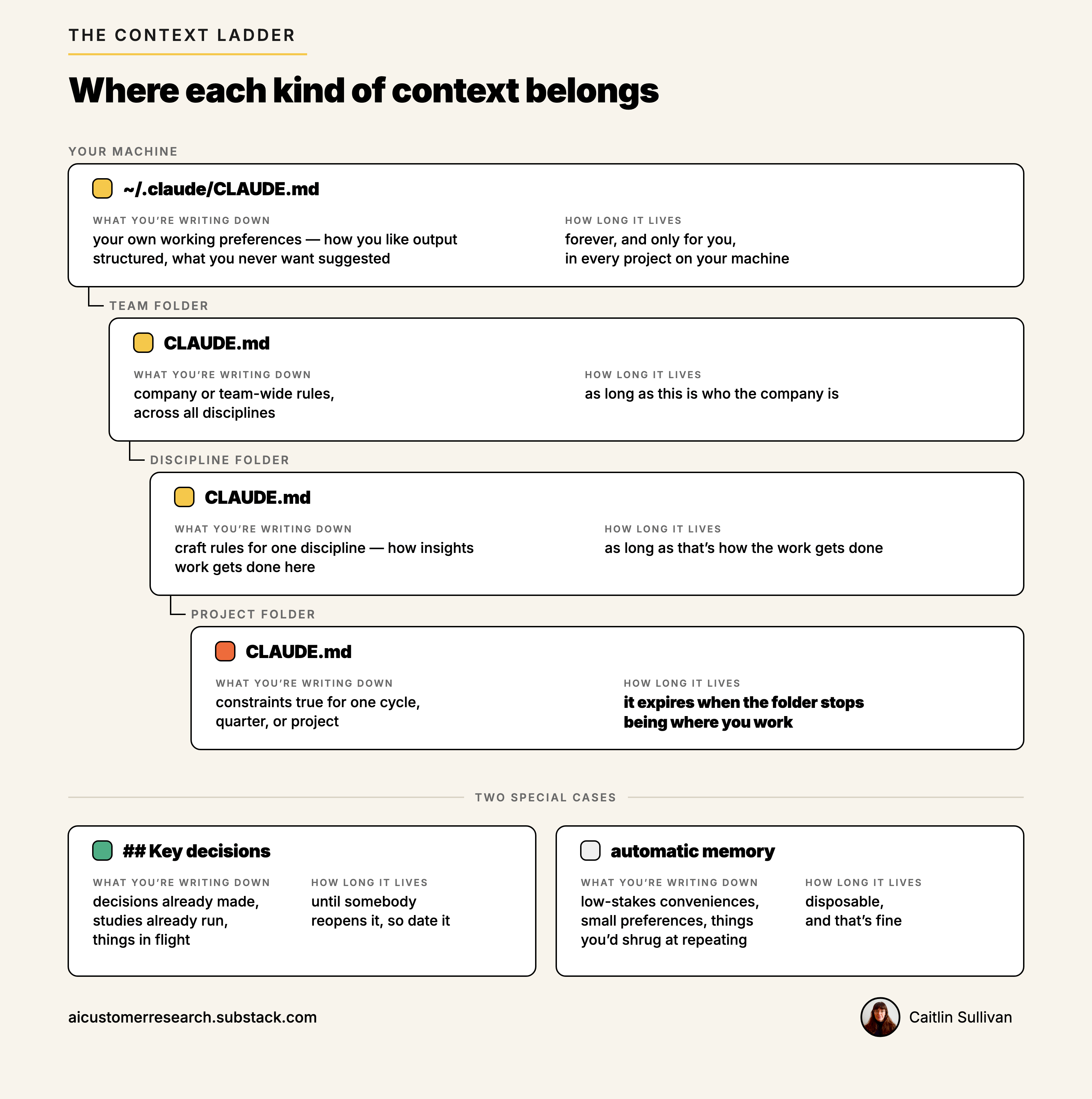
The fourth row is one we should take a longer moment to think about. If you put the right things into the project level there, it’s the fix for the wrong-level problem above, and it replaces a calendar reminder with a filing decision you make once.
〰️
The five-second audit
Check this: paste the two lines below into Claude Code and it’ll tell you which of your projects are over the ceiling.
wc -l ~/.claude/projects/*/memory/MEMORY.md
wc -c ~/.claude/projects/*/memory/MEMORY.md
Over 200 lines, or over 25KB — 25,600 bytes — and you’re losing entries off the bottom of that file without being told.
However, just know know that the limit is measured on the content that actually loads, and frontmatter and comments get stripped out before that happens. So a raw count can make a file look worse than it is. If you’d rather not do the arithmetic, just ask: “Check my memory files against the 200-line and 25KB limits, ignoring frontmatter and comments, and tell me which ones are actually over.”
Then I do recommend put a recurring 20 minutes in the calendar — quarterly is plenty — to open the memory files that matter and delete what’s no longer true. Pruning is worth it here. You can automate Claude to help you with this, too.
〰️
🎒 PACK UP
The next Claude Code for Customer Insights cohort is closing soon

The pricing freeze in the examples today is what I call a decision we’ve made — a settled thing that should be excluded from every workflow without you having to mention it. It’s just one of many info types I teach students to include in CLAUDE.md files for reliable, relevant insights work with Claude.
You saw a snippet of the actual course content I’m updating.
There’s loads more to learn in the course:
How to set up your file structures to help Claude find the right things, with fewer tokens
How to correctly design skills that are highly reusable (get that ROI, stop needing to revise them constantly!)
What you need to build into Claude code processes to make them good enough to automate (and trust the outputs)
Designing evals for your workflows so you don’t hope they work, you know it
…and more…
Claude Code for Customer Insights — enrollment closes Friday, August 28, cohort runs August 31 to September 11.
🌰 Trail mix
The Anthropic memory docs themselves — two pages, for some extra memory reading. Skim them, then run
/memoryin your own setup and see how much you recognize.LOCA-bench (Zeng, Huang and He, February 2026) — a benchmark that deliberately grows an agent’s context until it basically falls over. Agents get worse as their environment gets more complex, which you’d expect. The useful part: context management techniques improved the overall success rate. Deciding what not to load is work that’s worth taking time for.
—
Keep moving.
— Caitlin